Desktop Cleaner icon

A Mac cleaner that
shows its work

Desktop Cleaner finds the caches, large files, duplicates, and leftover app data quietly filling up your Mac — and shows you exactly what it found before anything is touched. Nothing is deleted without you seeing it first.
Free to scan · License to clean · macOS 13 or later · Notarized by Apple · Apple Silicon & Intel
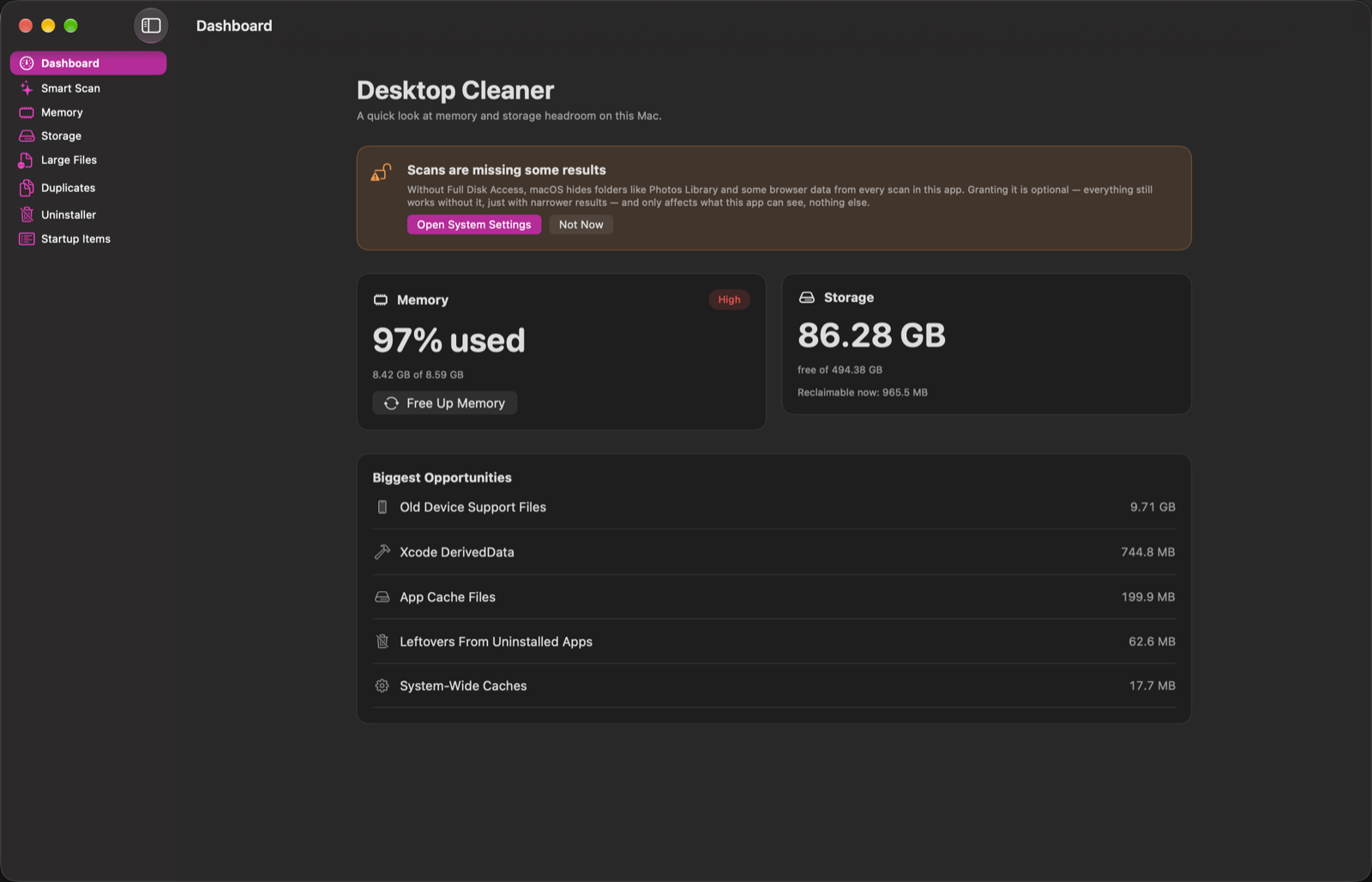
Desktop Cleaner's Dashboard, showing memory and storage headroom at a glance
What it does

Seven tools, one Mac

Each one does a specific, well-scoped job — no generic "optimize everything" button that you have to trust blindly.

✨

Smart Scan

One scan across storage, large files, and duplicates. Safe, regenerable junk can be cleaned right here — anything else goes to its own tab for a proper look first.

▤

Storage

App caches, logs, dev tool caches, old device support files, Homebrew cleanup, and more — grouped by risk, with system-level items clearly marked as needing your password.

◫

Memory

Live stats straight from the kernel's own counters — the same source Activity Monitor reads — plus a one-click way to ask macOS to purge reclaimable memory.

⛶

Large Files

Individual files above a size threshold, anywhere in your home folder — the exports, disk images, and downloads no cache category would ever find.

⧉

Duplicates

Byte-for-byte identical files, grouped and ready to review. One copy always stays — nothing here is ever pre-selected for you.

⌫

Uninstaller

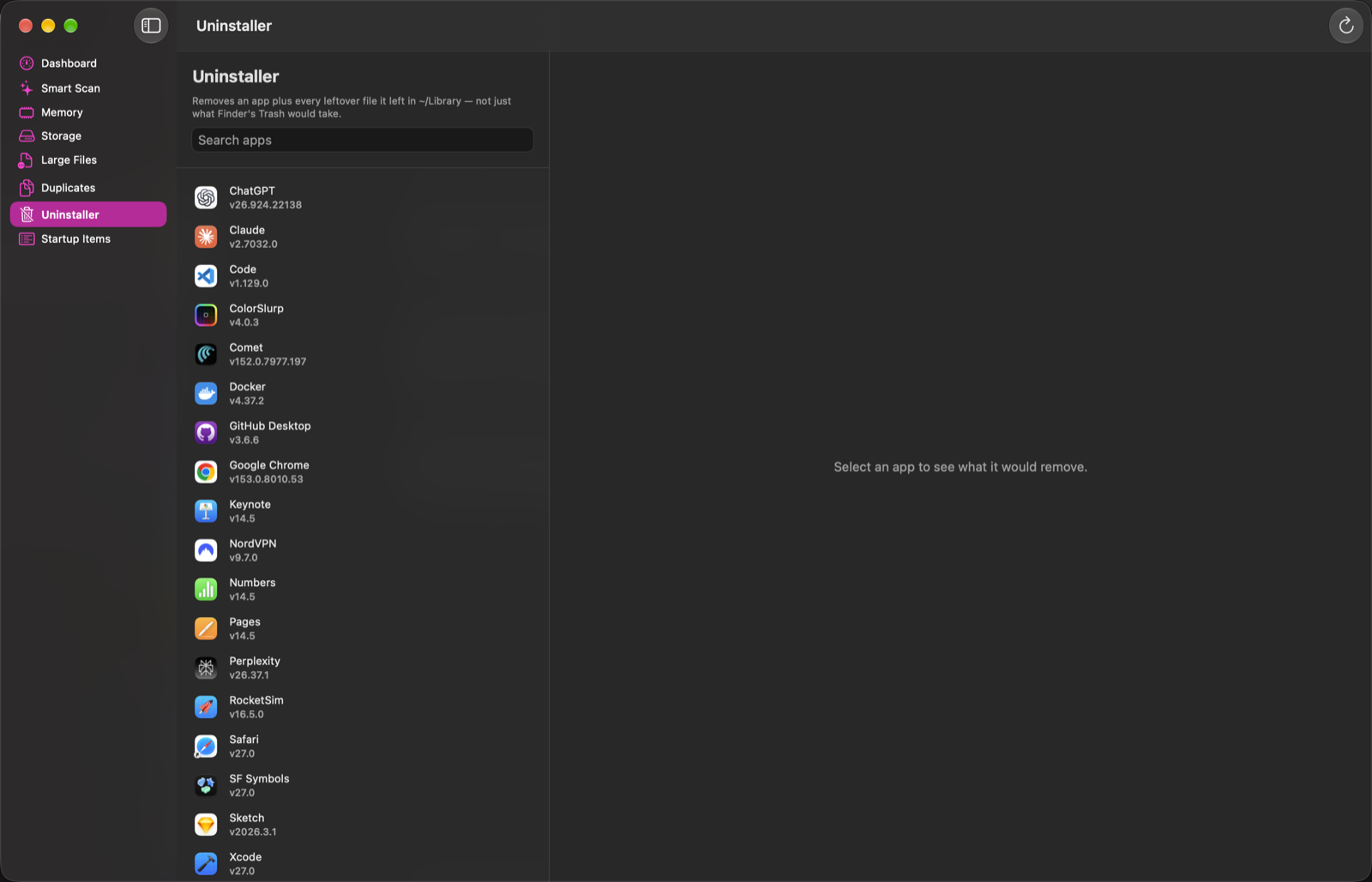
Removes an app plus every leftover file it left behind in ~/Library — not just what dragging it to the Trash would take.

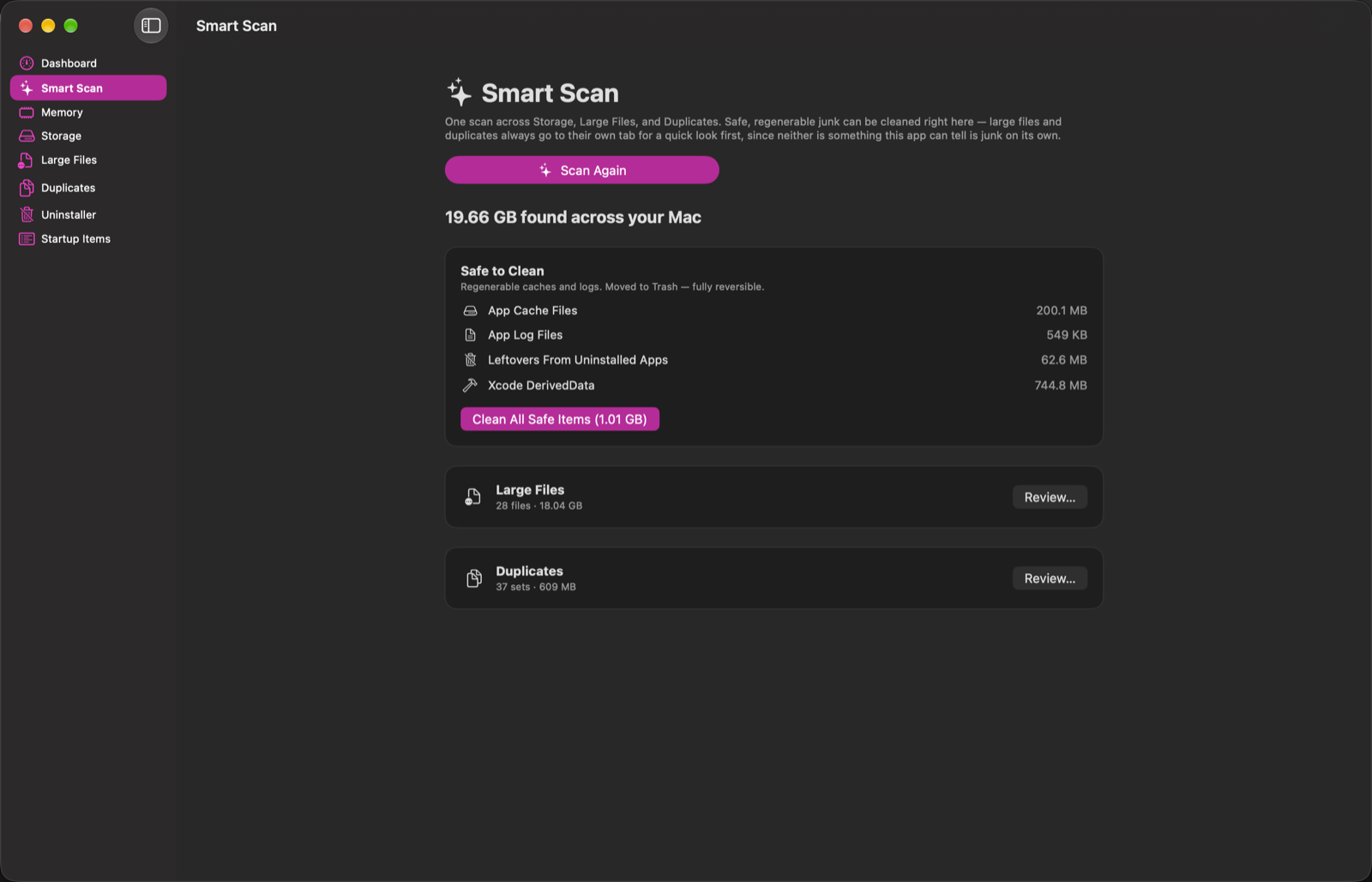
Smart Scan results showing storage found across the Mac, safe items to clean, and large files and duplicates ready to review
Smart Scan

One button, a full picture

Smart Scan runs Storage, Large Files, and Duplicates together and gives you one number: how much space is actually reclaimable right now.

  • Safe, regenerable caches can be cleaned in one click, right from this screen
  • Large files and duplicates always go to their own tab first — neither is something any tool can safely judge as "junk" on its own
  • Every category explains itself: what it is, where it lives, and why it's safe
The Uninstaller tab showing a list of installed apps ready to be fully removed
Uninstaller

Actually gone, not just moved

Dragging an app to the Trash leaves its caches, logs, preferences, and saved state behind — sometimes for years. The Uninstaller finds all of it.

  • Matches leftover files by bundle identifier, then shows you exactly what it found before removing anything
  • Every app on your Mac, searchable, with real installed versions
  • One click removes the app and everything it left behind — reversible via Trash
Pricing

Licensed to clean.

Scanning and reviewing what Desktop Cleaner finds is always free, with no time limit. A subscription unlocks actually acting on it.

Reviewing what's on your Mac is always free — you only pay when you're ready to remove something.

Privacy

Collects nothing, by design

Not "we minimize data collection" — there's no analytics SDK in this app to configure in the first place. You can verify every claim below yourself with a network monitor.

✓

No accounts, no sign-up

Scanning and reviewing never touches the network at all — everything happens on your own Mac.

✓

No analytics, no telemetry

No tracking of what you click, which features you use, or how often you open the app — ever.

✓

Crash reports are opt-in, every time

You see the full report and choose to send it or not — nothing is ever sent automatically in the background.

✓

Notarized by Apple

Signed with a Developer ID, notarized, and distributed directly — not sandboxed into a reduced-feature App Store edition.

See what's actually using your Mac's space

Free to scan and review — a license unlocks cleanup. macOS 13 or later, Apple Silicon and Intel.